Last updated: May 26, 2026
Quick Answer: Migrating from Shopify to Powergap is a structured, managed process handled by Powergap’s own technical team. It covers product data, customer history, and layout preferences — and is designed to minimize downtime. For most mid-sized shops, the switch takes a few weeks and includes two months free of charge. It’s best suited for shop owners who have outgrown Shopify’s update model, need ERP or POS integration, or have received legal compliance warnings.
Key Takeaways
- Powergap is a German-developed shop system built for scalability — it’s maintained, updated, and hosted by the same company that builds it
- The migration from Shopify to Powergap is handled by Powergap’s own engineers, not third-party contractors
- You get a dedicated contact person available on weekdays, with emergency support on weekends and public holidays
- The first two months are free of charge, and there are no additional fees for software updates
- Powergap supports ERP/inventory management systems, POS (point-of-sale) integration, and custom payment solutions
- Legal compliance features — such as mandatory ingredient lists, nutritional values, and quantity declarations — are built into the system
- Shops generating revenues in the double-digit millions trust the platform, alongside influencers and brand-driven retailers
- Custom development costs can be shared across multiple Powergap clients when features overlap
- You can reach Powergap for a free, no-obligation consultation at: +49 2291 808 77-0
Why Do Shop Owners Switch from Shopify to Powergap?
Most Shopify migrations happen because the platform stops keeping pace with a growing business. Shopify works well at the start — it’s affordable, quick to set up, and requires minimal technical knowledge. But as revenue grows and operational complexity increases, the cracks start to show.
The most common triggers for switching include:
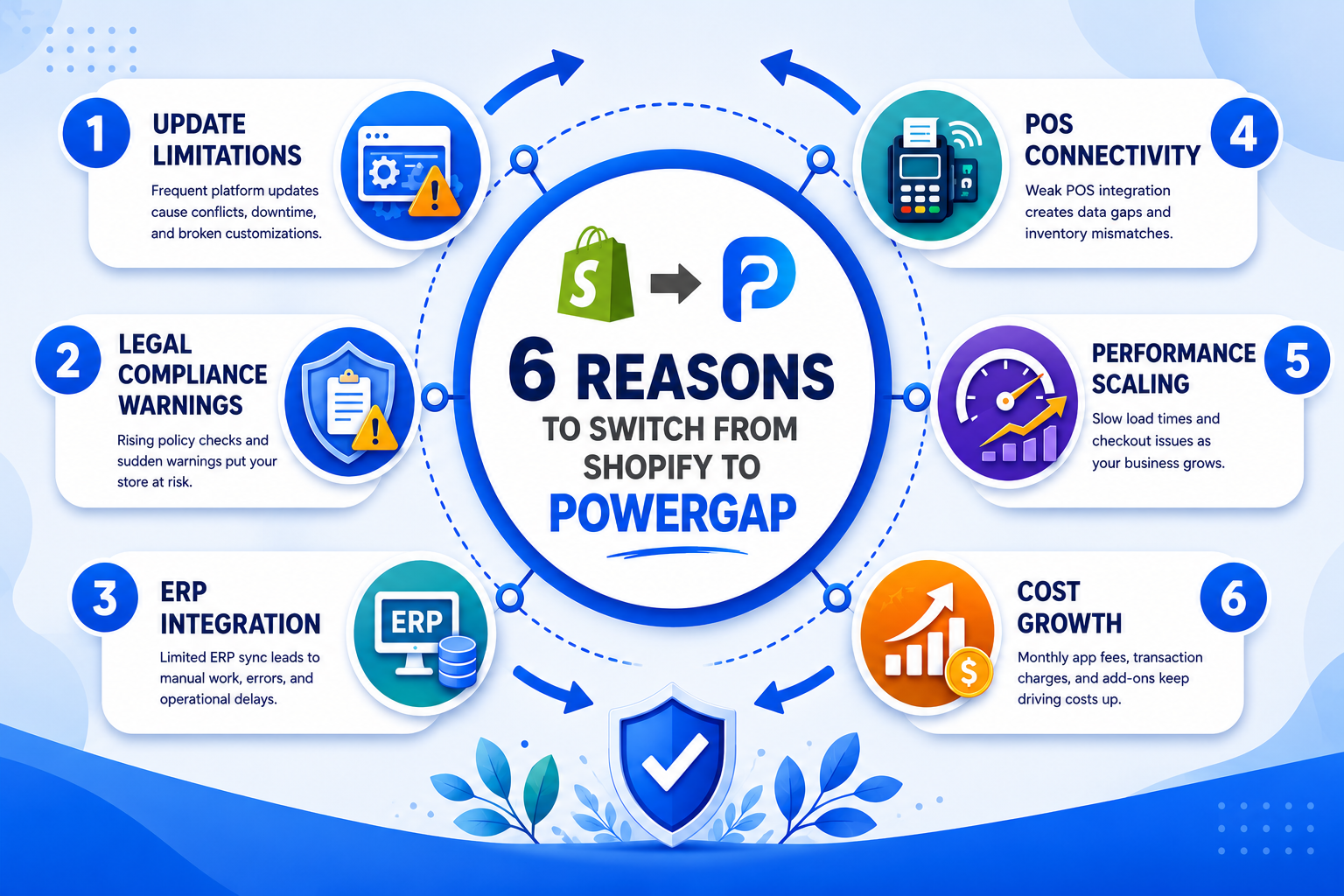
- Update limitations: Shopify’s update cycle is controlled by the platform. If a feature you need isn’t on their roadmap, you wait — or pay for expensive third-party apps.
- ERP and inventory system integration: Connecting a full warehouse management or ERP system to Shopify often requires workarounds, middleware, or costly custom development.
- POS connectivity: Retailers running both an online shop and a physical store frequently hit friction when trying to sync Shopify with a point-of-sale system.
- Legal compliance warnings (Abmahnungen): German competition law (enforced by bodies like the Wettbewerbszentrale) requires specific product information — nutritional values, ingredient lists, quantity declarations — to be clearly visible near the price. Shopify’s standard templates don’t always accommodate this cleanly, which has led to formal legal warnings for some shop operators.
- Performance at scale: As product catalogs grow and traffic increases, some operators find Shopify’s infrastructure less predictable than a dedicated, European-hosted solution.
- Cost creep: App subscriptions, transaction fees, and premium theme costs can push monthly Shopify expenses well above initial estimates.
Decision rule: If you’re running a food, supplement, cosmetics, or regulated product business in Germany or the EU, legal compliance features alone are often reason enough to switch. For everyone else, the tipping point is usually ERP integration or update frustration.
What Are the Main Differences Between Shopify and Powergap?
Shopify is a SaaS platform built for global scale and self-service. Powergap is a German-developed shop system built for operational depth and long-term client relationships. The two platforms serve different priorities.
| Feature | Shopify | Powergap |
|---|---|---|
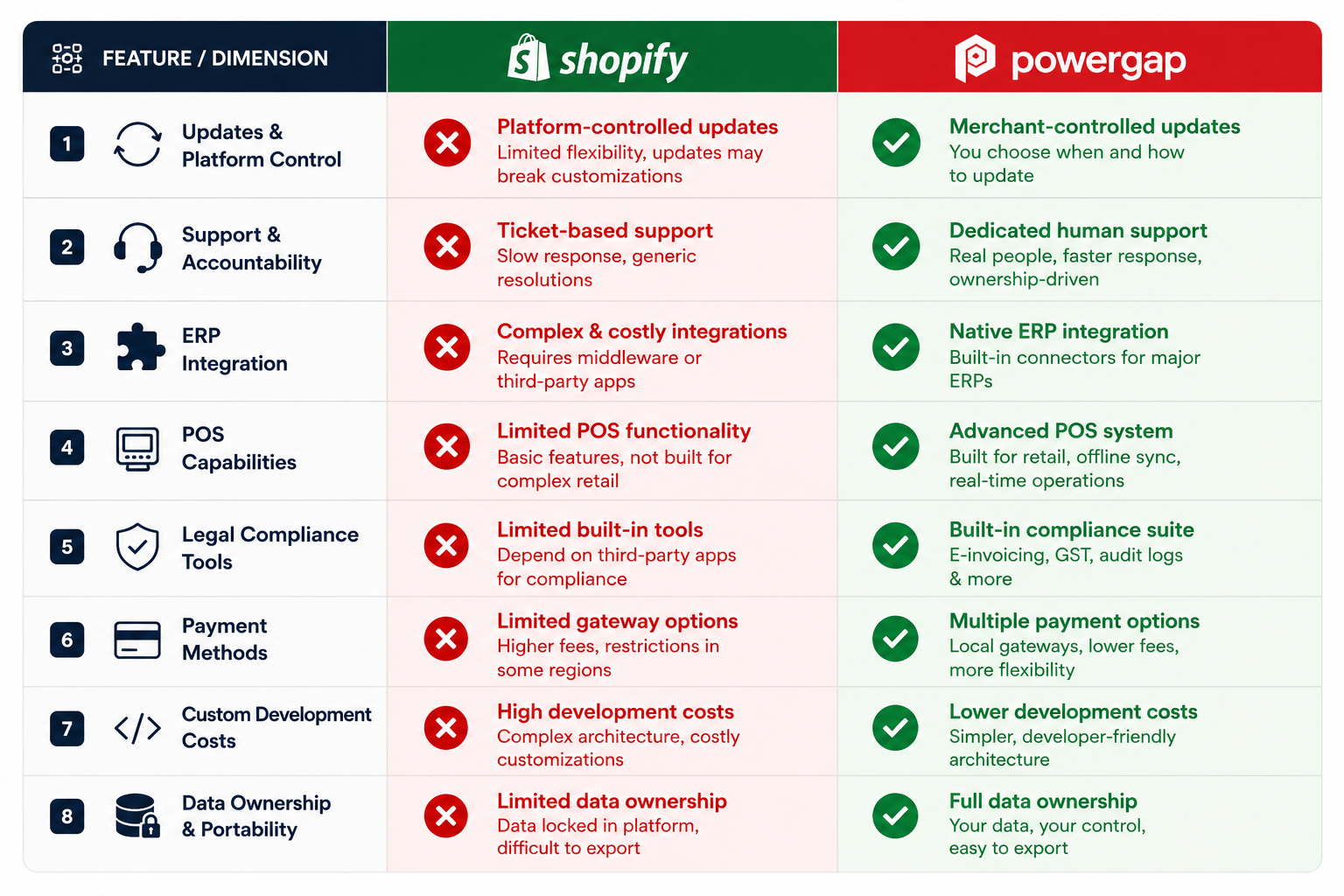
| Update model | Platform-controlled, app-dependent | Included, deployed in live operation |
| Hosting | Shopify-managed (global CDN) | Powergap-managed (German infrastructure) |
| ERP integration | Via third-party apps or API | Native integration capability |
| POS connectivity | Shopify POS (limited in DE) | Dedicated POS integration |
| Legal compliance (DE/EU) | Requires customization | Built-in feature support |
| Support model | Ticket/chat, no dedicated contact | Named contact person, phone support |
| Custom development | External agency or Shopify Partner | In-house, cost-shareable across clients |
| Update costs | Included (but app costs rise) | No update fees |
| Contract flexibility | Monthly plans | Short notice period, 2 months free to start |
The most meaningful difference for German shop operators is the support model. Shopify support is generalist and ticket-based. Powergap assigns you a named contact person you can call directly on weekdays — and reach in emergencies on weekends.
What Does the Migration from Shopify to Powergap Cost?
There is no single fixed price for a Shopify-to-Powergap migration — the cost depends on the complexity of your shop, the number of products, existing integrations, and any custom development required. However, the starting structure is transparent:
- First two months are free of charge — giving you time to test and validate the new system before committing to ongoing fees
- No fees for software updates — ever, for as long as you’re a client
- Custom development costs can be shared across multiple Powergap clients if the feature is useful to others — this significantly reduces per-client costs for common requests
- Ongoing maintenance, security patches, and system updates are included in the standard agreement
For a precise quote, Powergap offers a free, no-obligation consultation. You can reach the team at +49 2291 808 77-0.
Common mistake: Many shop owners only compare base subscription prices when evaluating platform costs. The real comparison should include app subscription costs (Shopify’s average merchant uses 6–10 paid apps), transaction fees, theme licensing, and agency costs for custom work. When those are factored in, Powergap’s all-inclusive model often comes out ahead for shops doing significant monthly volume.
What Are the Hidden Costs When Switching Shop Systems?
Beyond the migration fee itself, several costs catch shop owners off guard during a platform switch.
On the Shopify side (costs you may be leaving behind):
- Monthly app subscription fees (inventory sync, review tools, upsell plugins, etc.)
- Shopify transaction fees if you’re not using Shopify Payments
- Premium theme licensing fees
- Developer costs for customizations that broke after theme updates
During the migration:
- Staff time for data review, content checks, and testing
- Temporary SEO ranking fluctuations if URL structures change (this should be addressed with proper redirects — ask your migration team about this explicitly)
- Any custom integrations that need to be rebuilt for the new platform
On the Powergap side:
- Initial setup and migration fee (discussed in consultation)
- Custom development for highly specific features not already in the system
The two-month free period is specifically designed to absorb transition costs and give you time to validate that everything works before ongoing fees begin.
Which Data Can Be Transferred from Shopify to Powergap?
The Powergap migration team transfers your core shop data as part of the standard migration process. This typically includes:
- Product catalog: Names, descriptions, prices, variants, images, categories, and stock levels
- Customer data: Names, addresses, and account information (subject to GDPR compliance procedures)
- Order history: Past orders and transaction records where technically and legally transferable
- Layout preferences: Your design requirements and branding guidelines are discussed in a briefing session before migration begins
What doesn’t transfer automatically:
- Third-party app data (reviews from external platforms, loyalty points from Shopify-specific apps)
- Shopify-specific theme code — Powergap uses its own template system, so the visual design is rebuilt to your specifications rather than copied directly
- Custom scripts or Shopify Liquid code
Edge case: If you have a large catalog (10,000+ SKUs) or complex product variants, discuss data structure mapping in your initial consultation. The more complex the catalog, the more important it is to define the data schema before migration begins.
Can I Keep My Shopify Design and Templates?
No — Shopify themes use a proprietary templating language (Liquid) that is not compatible with Powergap’s system. Your visual design cannot be directly imported. However, this is not as disruptive as it sounds.
During the onboarding process, you provide your layout preferences, brand guidelines, and design references to the Powergap team. They rebuild the storefront to match your requirements within the Powergap environment. In many cases, this is also an opportunity to modernize the design and improve conversion-relevant elements like product page layout, checkout flow, and mobile responsiveness.
What you keep: Your brand identity, product photography, copy, and content strategy. What gets rebuilt: The technical implementation of the design within the new system.
How Long Does a Complete Shop Migration Take?
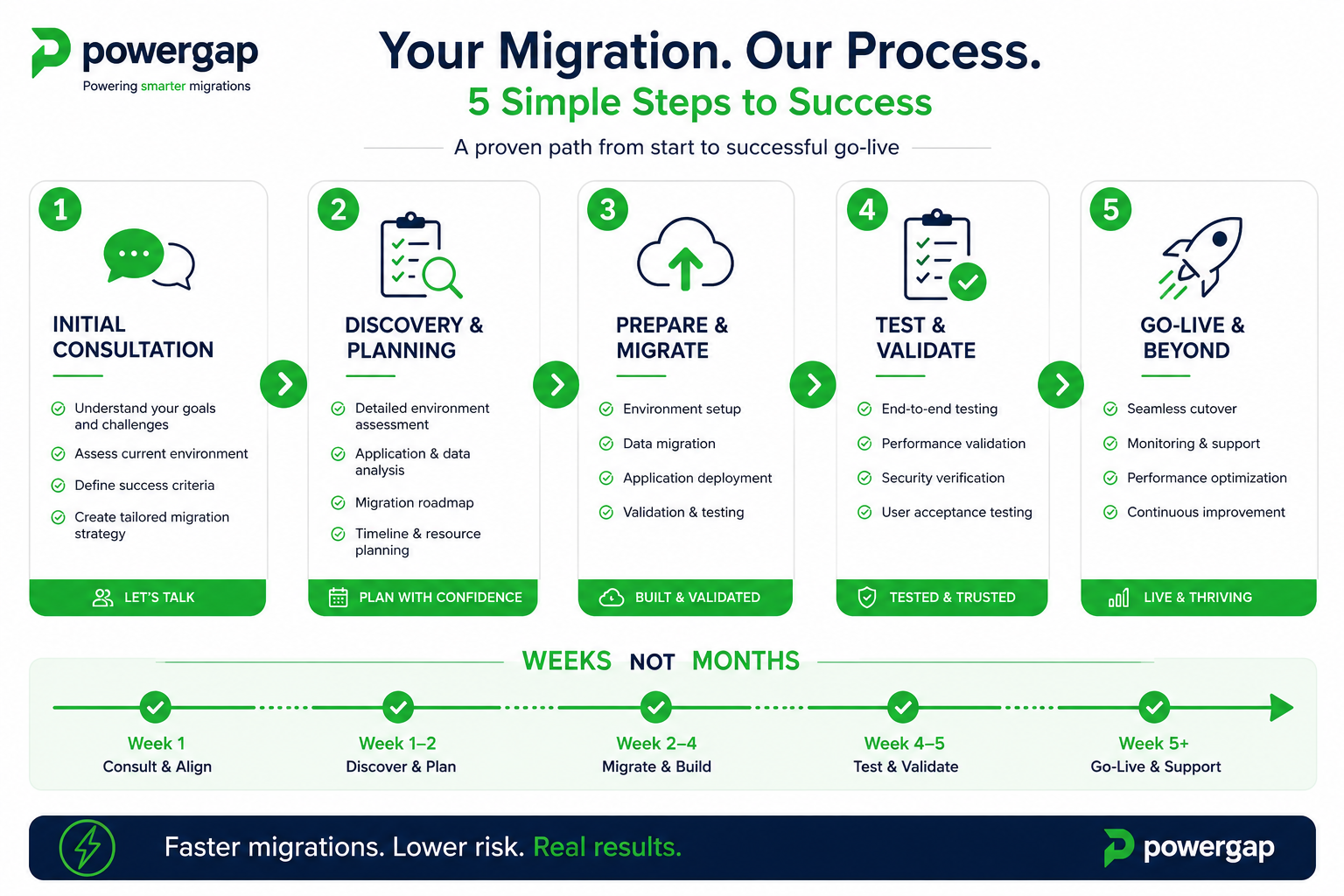
For most shops, the migration from Shopify to Powergap takes between two and six weeks from contract signing to go-live. The exact timeline depends on catalog size, the complexity of existing integrations, and how quickly you can provide the required data and design materials.
The general process runs as follows:
- Free consultation — you discuss your current setup, requirements, and future strategy with a Powergap advisor
- Contract signing — short notice period, two months free
- Data and design briefing — you provide product data, customer data, and layout preferences
- Migration and setup — Powergap’s technical team handles the transfer and configures standard features
- Testing and review — you review the migrated shop and request adjustments
- Go-live — the new shop launches, with your dedicated contact person available for immediate support
Common mistake: Underestimating how long it takes to gather and clean your own data. Product descriptions with missing fields, inconsistent category structures, or outdated images will slow the process. Doing a data audit before the migration briefing saves significant time.
Does Powergap Support My Existing Payment Methods?
Yes. Powergap supports integration with common payment providers used in the German and European market, including standard options like credit card processors, PayPal, and bank transfer. Integration with newer payment solutions is also possible through the platform’s API and development capabilities.
If you’re currently using a payment provider that isn’t in Powergap’s standard stack, raise this in your initial consultation. Custom payment integrations are achievable — the question is timeline and cost, both of which can be scoped before you commit.
Note for subscription or installment-based shops: If your Shopify setup uses recurring billing or buy-now-pay-later solutions, confirm compatibility early. These integrations vary in complexity.
Which Industries Is Powergap Particularly Well-Suited For?
Powergap is especially strong for shop operators in sectors where legal compliance, ERP integration, or omnichannel retail (online plus physical store) are priorities.
Best fit:
- Food, supplements, and cosmetics — where German and EU labeling laws require ingredient lists, nutritional declarations, and allergen information to be visible near the price
- Fashion and lifestyle brands with physical retail locations needing POS sync
- Mid-sized to large product catalogs where inventory management integration is essential
- Influencer and creator-driven brands that need a scalable backend behind a brand-forward storefront
- B2B and wholesale shops requiring customer-group pricing, order minimums, or account-based access
Less ideal for: Pure dropshipping operations that rely heavily on Shopify’s app ecosystem for supplier automation, or very small shops where Shopify’s self-service model is genuinely sufficient.
What Features Does Powergap Offer That Shopify Doesn’t?
Several Powergap capabilities are either unavailable on Shopify or require expensive third-party apps to replicate.
- Native ERP/inventory management integration without middleware
- Dedicated POS connectivity for physical retail locations
- Built-in legal compliance fields for German and EU product regulations (quantity declarations, nutritional values, ingredient lists in proximity to price)
- Named support contact — a real person you can call, not a ticket queue
- Update deployment in live operation — updates are applied without taking the shop offline, and Powergap guarantees functionality after every update
- Shared custom development costs — if multiple clients need the same feature, the cost is split
- No transaction fees on top of your payment provider’s standard rates
- Weekend and public holiday emergency support for critical issues
What Mistakes Should You Avoid When Switching Shop Systems?
The most costly mistakes in a platform migration are avoidable with preparation.
1. Not planning URL redirects. If your product and category URLs change during migration, you’ll lose search engine rankings built up over years. Insist on a redirect mapping plan before go-live.
2. Migrating dirty data. If your Shopify product data has inconsistencies — missing descriptions, duplicate entries, broken image links — migrating it as-is just moves the problem to a new system. Clean your data first.
3. Switching during peak season. Avoid migrating in the weeks before or during your highest-traffic periods (e.g., Q4 for most retail categories). Schedule the migration during a quieter window.
4. Skipping the testing phase. Every migration has edge cases — products that display incorrectly, filters that don’t work as expected, checkout flows with unexpected behavior. Budget time for thorough testing before going live.
5. Underestimating staff training. A new backend interface takes time to learn. Factor in training time for your team, especially for order management and product editing workflows.
6. Not discussing integrations upfront. If you rely on a specific ERP, accounting tool, or marketing platform integration, confirm compatibility and migration scope before signing anything.
How Complex Is Integrating My Existing Interfaces and Third-Party Systems?
Integration complexity depends entirely on what you’re connecting. Standard integrations — common ERP systems, payment providers, and shipping APIs used in the German market — are well within Powergap’s standard capability. More bespoke or legacy systems require a scoping conversation.
The right approach: in your initial consultation, list every third-party system your current Shopify shop connects to. Powergap’s team will tell you which are standard integrations, which require custom development, and what the realistic timeline and cost looks like for each.
Edge case: If you’re running a custom-built ERP or a heavily modified legacy system, expect a longer integration timeline. This is true of any platform switch, not just Powergap.
FAQ
Q: Can I test Powergap before committing to a full migration? A: Yes. Powergap offers a consultation and demo access so you can evaluate the system before signing a contract. Contact the team at +49 2291 808 77-0 to arrange this.
Q: What happens to my Shopify data after migration? A: Your data is migrated to Powergap’s infrastructure. You should maintain your own export of Shopify data as a backup before migration begins. Powergap creates multiple daily backups of your shop once you’re live on their system.
Q: Will my Google rankings drop when I switch? A: They can, temporarily, if URL structures change without proper redirects. A well-managed migration with a redirect plan minimizes this risk. Discuss SEO continuity explicitly with your migration team.
Q: How long is the contract notice period? A: Powergap uses short notice periods — the exact terms are discussed during consultation. The first two months are free of charge.
Q: Do I need technical knowledge to manage my shop on Powergap? A: No more than you’d need for Shopify. The backend is designed for shop operators, not developers. Your named support contact is available for questions and guidance.
Q: What if I need a feature that Powergap doesn’t currently offer? A: Custom development is available at reasonable rates. If the feature is relevant to multiple clients, costs are shared. Powergap’s system is continuously developed, and client feature requests feed directly into the roadmap.
Q: Is Powergap GDPR-compliant? A: Powergap is a German company operating on German infrastructure, and the platform is built with EU data protection requirements in mind. Confirm specific compliance requirements for your use case during consultation.
Q: Can I keep my existing domain when switching to Powergap? A: Yes. Domain migration is part of the standard process. Your existing domain points to the new Powergap-hosted shop after go-live.
Q: What support is available after migration? A: You have a named contact person available by phone on weekdays. For critical issues, support is also available on weekends and public holidays.
Q: Is Powergap suitable for B2B shops? A: Yes. Powergap supports B2B-specific features including customer group pricing, account-based access, and order management workflows suited to wholesale operations.
Q: How are software updates handled? A: Updates are deployed in live operation — your shop stays online during updates. Powergap guarantees functionality after every update, and there are no additional fees for updates.
Q: What if I’m not satisfied after migration? A: The short contract notice period means you’re not locked in long-term. The two-month free period is also designed to give you time to validate the system before ongoing fees begin.
To arrange a free, no-obligation consultation about switching from Shopify to Powergap, call: +49 2291 808 77-0